Turning Metal AI: Follow a Chrome Surface Across the Silhouette
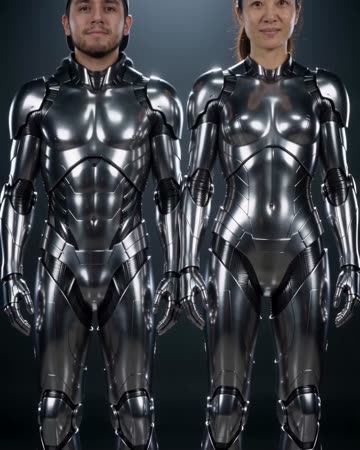
A reflective chrome transformation rises from the feet across the legs, clothing and torso, finishing at the face. The camera tilts upward with the change. Metallic shimmer and quiet cinematic music accompany the progression.
Use the effect as a futuristic character reveal or a material-themed transition. Keep any real product shot separate from the imagined chrome surface.
Inside this effect
Chrome rises from the feet
A polished chrome transformation travels upward across legs, clothing, torso and finally the face. The camera tilts with the change and ends on recognizable metallic figures.
What makes the composition readable
A recognizable outline is more useful than a glossy source image. If the original is already covered in strong reflections, the added transformation can become harder to distinguish.
Sound in a new creation
A soft metallic shimmer follows the spreading surface, supported by a restrained cinematic drone.
Choose the output for your edit
New drafts start at 12 seconds, 720p and vertical 9:16. Advanced shows the models and compatible lengths, resolutions and formats. Check the total credits before generating; the options follow the selected model.
From source photo to finished clip
Start with a solo or shared photo, or choose two separate sources when the idea includes a pair. Confirm the crop and current settings before generating.
Establish the original surface
Use a source whose clothing texture can be compared with the transformed result.
Follow the material spread
Inspect the boundary between ordinary fabric and reflective chrome.
Cut on a readable highlight
Choose a frame where the silhouette still reads, then connect your next scene.
Ways to use the result
A futuristic identity reveal
Let the transformation complete before introducing the character name on a clean title.
A material-themed transition
Cut from the metallic finish to an actual object when discussing real materials, keeping their properties separate.
Prepare the source for this movement
- Choose clearly outlined clothing.
- Avoid a mirror-like background.
- Keep important facial features unobstructed.
Metal coverage and reflections are generated and may alter facial or clothing detail. They do not describe an object's real finish, durability or physical properties.
Frequently asked questions
Can I choose gold instead of chrome?
This preset has no material selector; its current direction is reflective chrome.
Will the face stay completely untouched?
No. The intended transformation includes the face after the lower body and torso. Review recognizable facial structure and the final metallic figure; the effect can change small details.
Why are reflections inconsistent?
The model invents unseen lighting and surfaces from a single photograph rather than performing a physical render.
Can I use it to preview product plating?
Only as a creative mood reference, not an accurate manufacturing or finish specification.
Does it begin at the face?
The current direction begins at the feet and moves upward, finishing with the face.
Can I stop halfway through the body?
There is no coverage mask or stop-height field. Review the generated progression and trim the downloaded clip if useful.
Where is the cost shown, and what if generation fails?
The generation button shows the total for your selected model and output settings. Credits are deducted when the task is created; credits for a task confirmed failed are returned. Review the displayed total rather than assuming every model costs the same.
Explore another direction

Disintegration AI
story endings
Golden particles dissolve the source subjects from their edges toward their faces. The fixed room and furniture remain after the figures disappear, giving the clip a clear exit rather than only a decorative overlay.

Comic Book AI
comic avatar visuals
Bold outlines and flat comic colors transform the source subjects while small expressions continue. Clean graphic panels frame the shot without relying on automatically readable dialogue.

Outfit Switch AI
outfit collections
In a clean studio, a finger snap and flash reveal a different casual outfit; a second snap reveals formal eveningwear. Face, hair and body position remain the continuity anchors.
Turning Metal AI
Use a source whose clothing texture can be compared with the transformed result.
Create this effect