Raindance AI: A Warm Pier Scene With Gentle Rhythm
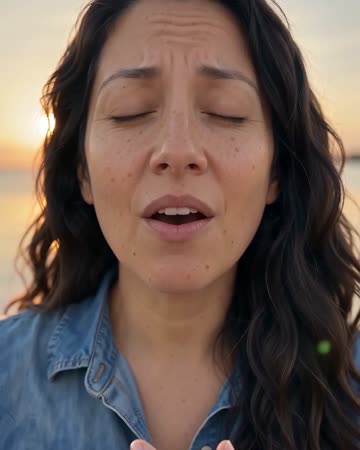
This direction places the portrait on a wooden pier in warm late-day light. Breeze, water and a light body rhythm build the mood while the subject generally faces the camera. The preset requests a short original vocal performance, a light beat and waterside ambience.
Use it for a relaxed seasonal intro or a waterfront mood insert. Listen to the generated vocal, beat and water ambience, then choose cuts around the close-up and seated pier reveal.
Inside this effect
Close-up, then the sunset pier
A brief source opening cuts to a warm singing close-up, then a wider view of the same person seated on a wooden pier. Face and outfit continuity connect the shots through breeze and calm water.
What makes the composition readable
The setting carries much of the appeal. Keep the action modest so moving hair, clothing and reflected light do not all compete with the face.
Sound in a new creation
A brief original vocal, light beat and waterside ambience accompany the cuts. The trend’s named track is not supplied.
Choose the output for your edit
New drafts start at 12 seconds, 720p and vertical 9:16. Advanced shows the models and compatible lengths, resolutions and formats. Check the total credits before generating; the options follow the selected model.
From source photo to finished clip
Upload one clear still image as the starting point. Check the selected frame and Advanced settings, then review the full generated clip before downloading.
Choose a calm pose
Use a portrait with a comfortable forward-facing expression.
Check water and silhouette
Inspect hair, clothing edges and pier contact during the sway.
Match the mood in editing
Replay the original vocal excerpt, waterside ambience and visual rhythm, keeping cuts aligned with the gentle movement.
Ways to use the result
A summer mood opener
Let the pier reveal introduce a relaxed chapter, then cut to your real waterside photographs.
A portrait-to-place reveal
Begin with the close expression and reserve the scene title for the wider pier view.
Prepare the source for this movement
- Choose a clear waist-up portrait.
- Keep hair away from the eyes.
- Show enough torso to read the body rhythm.
The preset generates a pier scene with a brief original vocal and waterside ambience, not the trend's original track or exact choreography. Check reflections, clothing and vocal-mouth alignment.
Frequently asked questions
Do I need a real pier photograph?
No. A readable portrait is the input; the preset aims to create the waterfront setting.
Does Raindance mean a rainy scene here?
This preset's direction is a warm golden-hour pier with breeze and gentle movement, rather than a controlled rain simulation.
Will it reproduce the trend's exact dance?
It aims for light body rhythm, not step-for-step choreography or pose tracking.
Why can the hair change shape?
Breeze and motion require inferred strands. Use an unobstructed source and reject unstable facial-edge sections.
Is this one unbroken camera shot?
The direction uses concise cuts from the source to a close-up and a pier-wide ending. Check the same identity across those views.
Does the whole body dance on the pier?
The current scene ends with the person seated by the water. For a full-body original dance sequence, use AI Dance.
Where is the cost shown, and what if generation fails?
The generation button shows the total for your selected model and output settings. Credits are deducted when the task is created; credits for a task confirmed failed are returned. Review the displayed total rather than assuming every model costs the same.
Explore another direction
Gas Station AI Trend
Native-audio performance · photo to video
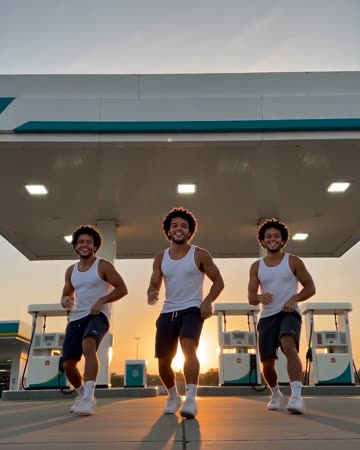
A wide forecourt dance cuts to a smiling selfie close-up, then to the same lead beside an open car door. A second visible source can remain as a consistent companion.
AI Dance Video
Native-audio performance · photo to video
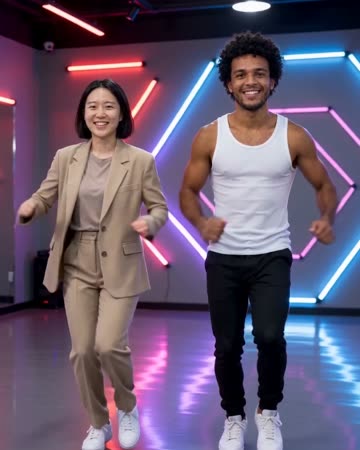
A neon-lit studio frames complete bodies performing an original short sequence. Side steps, shoulder bounces and light arm gestures lead into a settled final pose with stable spacing.
Northern Lights AI
travel dreams
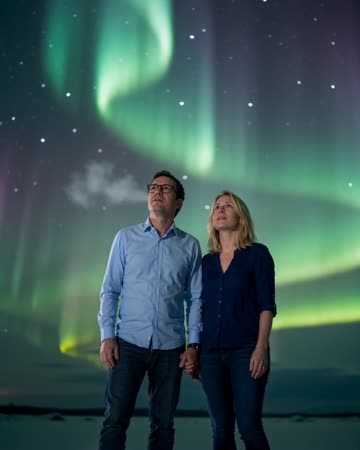
Slow aurora ribbons cross a natural night backdrop while the source subject stays calmly posed. Sky space and visible facial detail need to work together rather than competing.
Raindance AI Trend
Use a portrait with a comfortable forward-facing expression.
Create this effect