Luxury Lobby AI: Use Marble, Warm Light and Spatial Depth
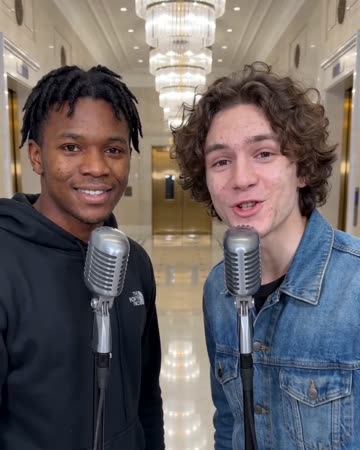
This direction uses a warm marble interior and soft reflections to establish an expansive setting. A small push-in supports a relaxed performer rather than turning the scene into a fast property tour. The preset requests short original stage vocals and soft backing music.
Try a premium-looking personal entrance or a setting-led performance insert. Use real location footage if the video needs to describe an actual hotel.
Inside this effect
Reflections around a clear face
Warm marble and soft reflections establish a spacious lobby while a small push-in follows the performer. Keep the face as the anchor rather than letting the architecture become a property tour.
What makes the composition readable
The face should remain the focal point despite reflective floors and bright fixtures. Simple source clothing can help separate the subject from an ornate invented interior.
Sound in a new creation
Short original stage vocals, soft backing and room reverberation support the lobby mood. They are generated with the shot.
Choose the output for your edit
New drafts start at 12 seconds, 720p and vertical 9:16. Advanced shows the models and compatible lengths, resolutions and formats. Check the total credits before generating; the options follow the selected model.
From source photo to finished clip
Start with a solo or shared photo, or choose two separate sources when the idea includes a pair. Confirm the crop and current settings before generating.
Choose the lobby subject
Select one or two people who remain readable at medium framing.
Inspect the reflections
Review the face, floor contact and bright interior highlights.
Define the setting's role
Keep it as fictional atmosphere or cut to verified location footage.
Ways to use the result
A polished introduction
Use the lobby as an imagined entrance, then show actual work or real location footage to establish context.
A melodic transition
Cut between a close performer shot and the wider lobby to vary the visual scale of a music edit.
Prepare the source for this movement
- Choose a waist-up portrait or balanced duo image.
- Keep fabric outlines clear against the source background.
- Avoid strong glare already covering the face.
The generated lobby does not identify a real hotel, service level or booking offer. Original short vocals and room reverberation serve the performance mood, not a real hotel tour.
Frequently asked questions
Is this the same room as Hotel Lobby AI?
This direction emphasizes a marble lobby's depth and reflections; Hotel Lobby AI centers a microphone-booth duo exchange.
Can I choose a real hotel?
The form has no hotel-name or location control. The lobby is a generated setting, not a verified venue.
Why does the floor reflection differ from the person?
Reflections are inferred rather than physically measured and need inspection in moving frames.
Can this be a hotel advertisement?
Use real hotel material for factual amenities and location claims; this shot can only provide clearly creative atmosphere.
Will polished floors preserve clothing colors exactly?
Reflections and lighting can change appearance. Use real footage when accurate garment color or material is the purpose.
Where is the cost shown, and what if generation fails?
The generation button shows the total for your selected model and output settings. Credits are deducted when the task is created; credits for a task confirmed failed are returned. Review the displayed total rather than assuming every model costs the same.
Explore another direction
AI Music Video
Native-audio performance · photo to video
Warm marble, receding chandeliers and a gradual approach frame a brief vocal performance. A solo source keeps one singer; two people exchange phrases and glances at a shared microphone.
Red Carpet AI
event teasers
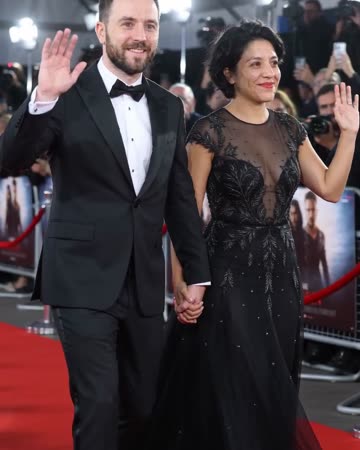
Formal eveningwear, a small forward step and a wave establish the arrival. Camera flashes alternate around the source people while the face and body remain the visual anchors.
Studio Booth AI
Native-audio performance · photo to video
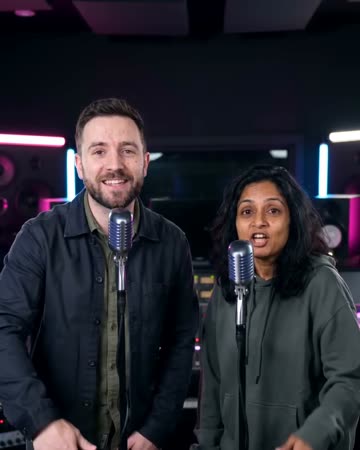
A dark recording booth and soft rim light frame natural microphone gestures. Equipment stays softly out of focus so the mouth, hands and expression carry the intimate performance.
Luxury Lobby AI
Select one or two people who remain readable at medium framing.
Create this effect