
Levitation AI: Make the Gap Between Feet and Ground Readable
Levitation reads through the changing gap beneath the feet. This direction raises the subject gently in a steady wide view, with subtle clothing movement supporting the floating impression. The preset requests floating-air effects and soft atmospheric music.
Use a gentle rise for a dream sequence or fantasy introduction. Keep the next cut consistent with the floating direction and review the generated air sounds and music before export.
Inside this effect
The gap beneath the feet
A steady wide view shows the subject rising gently above the ground. Subtle clothing movement supports the floating impression while the visible floor provides the reference for height.
What makes the composition readable
Without a visible ground reference, the shot may look like a crop moving rather than a person floating. Keep floor texture or surrounding objects that help establish height.
Sound in a new creation
Soft air movement and atmospheric music accompany the lift, without an explanation spoken over the scene.
Choose the output for your edit
New drafts start at 12 seconds, 720p and vertical 9:16. Advanced shows the models and compatible lengths, resolutions and formats. Check the total credits before generating; the options follow the selected model.
From source photo to finished clip
Start with a solo or shared photo, or choose two separate sources when the idea includes a pair. Confirm the crop and current settings before generating.
Keep the ground reference
Choose a standing full-body image with visible floor or terrain.
Inspect the lift
Watch foot separation, shadows and leg proportions.
Complete the dream beat
Select a stable floating section and pair it with the next scene.
Ways to use the result
A dream entrance
Begin with visible contact on the ground and let the small rise introduce a fantasy chapter.
A calm visual pause
Keep the background simple and use a brief hold before returning to normal movement in the next shot.
Prepare the source for this movement
- Show both feet and ground below them.
- Leave space above the head for the rise.
- Avoid leaning heavily on furniture.
Ground shadows and anatomy are inferred rather than physically simulated. The image does not demonstrate a real levitation technique or reliable height measurement.
Frequently asked questions
Is a tight airborne crop enough?
Without visible ground and feet, the effect can read as camera motion. Choose a wider source when the gap is the main idea.
Why does the shadow stay behind?
The model can infer shadows inconsistently; inspect ground contact and reject obviously disconnected sections.
Can I set the floating height?
There is no height field; the rise is determined by the generation.
Should the source show someone jumping?
No. A calm standing pose provides a clearer starting point for a gentle rise.
Can two people float in one scene?
A pair can be supplied through a shared image or optional separate sources. Keep both sets of feet visible to review the lift.
Where is the cost shown, and what if generation fails?
The generation button shows the total for your selected model and output settings. Credits are deducted when the task is created; credits for a task confirmed failed are returned. Review the displayed total rather than assuming every model costs the same.
Explore another direction

Angel Wings AI
fantasy portraits
Feathered wings open behind the source subject with soft backlight and restrained feather motion. Shoulder junctions and space on either side make the reveal easier to understand.
Bullet Time AI
sports concepts
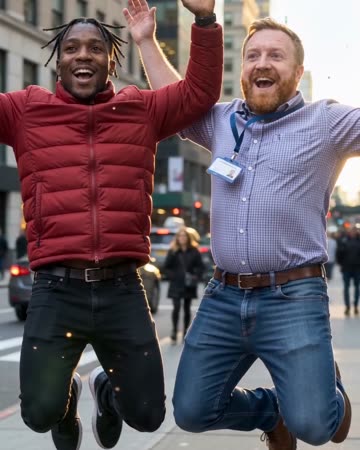
The source subjects leap, slow to an almost suspended pose and remain airborne during a short lateral camera arc. Shifting background parallax supplies the sense of moving around the moment.
Giant AI Video
urban concepts
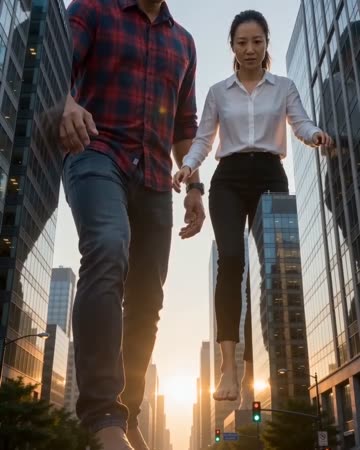
A low street view places the source people between city buildings at giant scale. A slow careful step and small cars below establish the contrast while the figures stay recognizable.
Levitation AI
Choose a standing full-body image with visible floor or terrain.
Create this effect