Fan Outfit Change AI: Use Occlusion as a Transition Beat
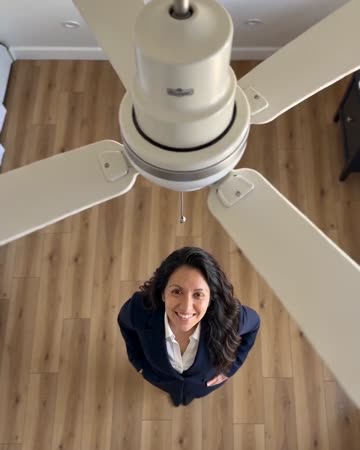
An overhead view places spinning fan blades between the camera and the subject. Each passing blade acts as a temporary visual curtain for an outfit change while the subject’s position aims to stay stable. The preset requests rhythmic fan sounds and outfit-transition effects.
Use a short reveal for a style mood board or a transition into a real outfit clip. Cut on the occlusion beat to connect the generated moment to your own footage.
Inside this effect
A passing blade becomes the transition
The view stays overhead as slowly turning fan blades pass across the lens. Each full occlusion reveals another outfit while the subject’s position and identity aim to remain stable.
What makes the composition readable
An overhead direction changes how shoulders and clothing are seen. Clear body outlines in the source help, but the unseen top view still needs to be inferred.
Sound in a new creation
Rhythmic fan sounds and transition cues follow the blade occlusions, with no extra dialogue.
Choose the output for your edit
New drafts start at 12 seconds, 720p and vertical 9:16. Advanced shows the models and compatible lengths, resolutions and formats. Check the total credits before generating; the options follow the selected model.
From source photo to finished clip
Upload one clear still image as the starting point. Check the selected frame and Advanced settings, then review the full generated clip before downloading.
Prepare the stable silhouette
Choose a source where the clothing can be separated from the background.
Inspect each blade reveal
Check whether face and body position jump unexpectedly during occlusion.
Cut on the cover
Use a passing blade as an edit point before a real outfit shot.
Ways to use the result
An outfit mood board
Use each reveal as a style suggestion and add your own labels after the final relaxed pose.
A cut into real clothing
Match a blade occlusion to an edit into your actual outfit footage, keeping garment claims with the real shot.
Prepare the source for this movement
- Show a distinct torso and clothing outline.
- Avoid objects crossing the shoulders.
- Keep the pose simple and balanced.
Outfits and fan motion are generated, with no garment list or exact switch-count control. The result is not a realistic clothing fit or equipment demonstration.
Frequently asked questions
Can I upload several outfits to cycle through?
This form takes one photo and does not offer a multi-garment sequence editor.
Must I stand under a real fan?
No. The overhead transition is generated from the source portrait.
Why is the body shape different from above?
The original view may not show that angle, so the model must infer shoulders and clothing geometry.
How does this differ from Outfit Switch?
Here the fan's occlusion supplies the transition beat; Outfit Switch uses a more direct natural turn.
Can I arrange the exact outfit order?
No wardrobe list or sequence timeline is available. The preset generates the clothing changes during the fan passes.
Can I choose a lower camera angle?
The overhead view is part of this effect. Use Outfit Switch for a studio-based finger-snap reveal.
Where is the cost shown, and what if generation fails?
The generation button shows the total for your selected model and output settings. Credits are deducted when the task is created; credits for a task confirmed failed are returned. Review the displayed total rather than assuming every model costs the same.
Explore another direction
Outfit Switch AI
outfit collections
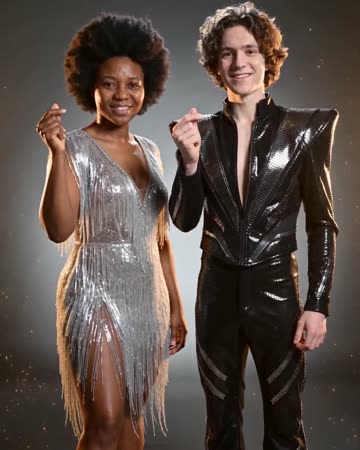
In a clean studio, a finger snap and flash reveal a different casual outfit; a second snap reveals formal eveningwear. Face, hair and body position remain the continuity anchors.

AI Halloween Costume
seasonal outfit edits
Everyday clothing becomes a playful Halloween outfit under warm party light. One natural turn and a small light cue carry the reveal while the face remains open and recognizable.
Comic Book AI
comic avatar visuals
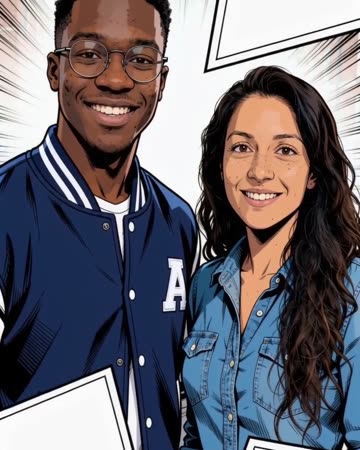
Bold outlines and flat comic colors transform the source subjects while small expressions continue. Clean graphic panels frame the shot without relying on automatically readable dialogue.
Ceiling Fan Outfit Change AI
Choose a source where the clothing can be separated from the background.
Create this effect