AI Zombie Trend: Turn Surprise Into a Non-Graphic Reunion
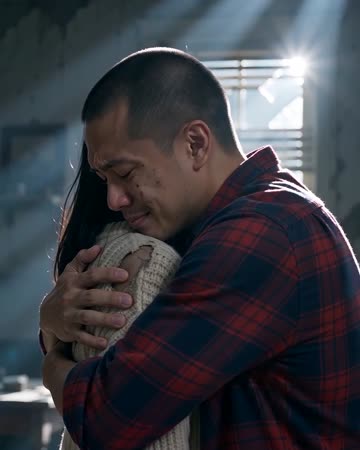
The story here is an emotional turn: surprise in a post-apocalyptic setting softens into a gentle hug. Lighting and expressions provide the tension without requiring graphic injury. The preset requests music that shifts from tense to warm, with scene ambience.
Use it as a fictional genre twist or a playful Halloween story. Keep an opening cue that establishes fiction before the emotional reunion.
Inside this effect
A memory between two worlds
A cool abandoned interior frames recognition between the pair. A brief warm memory shows them alive and smiling before the clip returns to the present and ends in an embrace.
What makes the composition readable
The transformation should still leave the two subjects identifiable. If stylized makeup consumes the face, the reunion loses the connection that makes the scene understandable.
Sound in a new creation
Music shifts from tension to warmth with scene ambience. No violent action or graphic injury is part of the direction.
Choose the output for your edit
New drafts start at 12 seconds, 720p and vertical 9:16. Advanced shows the models and compatible lengths, resolutions and formats. Check the total credits before generating; the options follow the selected model.
From source photo to finished clip
Add one clear portrait per person or use a shared photo. In separate-photo mode, check the prepared two-person composition before submitting.
Establish the pair
Start with two clear faces before introducing the genre setting.
Check the emotional transition
Review the change from surprise to closeness and inspect arm contact.
Frame it as fiction
Add a genre title or story context without suggesting a real event.
Ways to use the result
A Halloween story beat
Use a short fictional setup before the memory cut so the audience understands why the reunion matters.
A genre contrast
Match cold and warm title colors to the two time layers, then remove text during the final contact.
Prepare the source for this movement
- Add two clear waist-up portraits, or a photo together with little overlap between people.
- Keep eyes and mouth contours visible.
- Avoid pre-existing heavy horror makeup.
Stylized facial changes can reduce likeness, and overlapping arms may distort. The preset aims for non-graphic storytelling rather than detailed injury simulation.
Frequently asked questions
Can I request graphic zombie injuries?
This preset is a non-graphic recognition-and-hug story, with no injury-detail or weapon control.
Why does likeness weaken after styling?
Makeup and lighting reinterpret facial features. Review both faces rather than judging only the background mood.
Can it be used as a Halloween greeting?
Yes as a fictional clip, provided the tone suits the audience and the people shown are comfortable with it.
How do I keep the reunion understandable?
Use a clear two-person source and preserve the reaction before the hug instead of trimming away all context.
Does the whole clip stay in one time period?
The direction includes a warm memory cut between the cool present-day shots. Review that both identities remain consistent across the change.
Where is the cost shown, and what if generation fails?
The generation button shows the total for your selected model and output settings. Credits are deducted when the task is created; credits for a task confirmed failed are returned. Review the displayed total rather than assuming every model costs the same.
Explore another direction
AI Halloween Costume
seasonal outfit edits
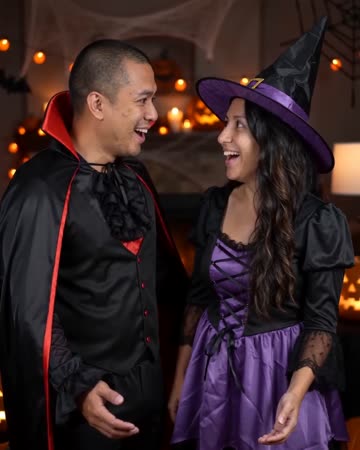
Everyday clothing becomes a playful Halloween outfit under warm party light. One natural turn and a small light cue carry the reveal while the face remains open and recognizable.

AI Hug Generator
reunion edits
The pair move closer and bring their arms together while the camera stays steady. Leave shoulder space in the starting composition so the contact can develop visibly rather than beginning with tangled limbs.
Comic Book AI
comic avatar visuals
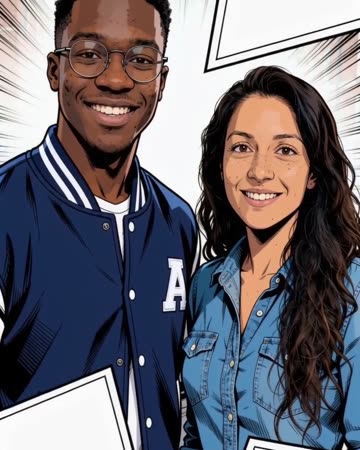
Bold outlines and flat comic colors transform the source subjects while small expressions continue. Clean graphic panels frame the shot without relying on automatically readable dialogue.
AI Zombie Trend
Start with two clear faces before introducing the genre setting.
Create this effect