AI Video Effects: Choose by Action, Not Just the Effect Name
Use the current creator for a continuous Earth zoom-out from your photo. Browse the related effect pages when you want a hug, wardrobe transition or a different visual transformation.
Use the planet-scale ending as a transition from a personal photograph to a larger theme, or browse a different dedicated creator when the story needs another action.
Inside this effect
This creator opens on an Earth pullback
The current effect rises from the source photograph through streets, coastline and clouds to an entire Earth view. Other catalog effects are separate directions rather than layers added to this shot.
What makes the composition readable
A recognizable subject anchors the first moment. The camera then invents space beyond the source as it rises toward a planet-scale ending.
Sound in a new creation
Rising air and spacious music accompany the camera journey; the direction adds no dialogue.
Choose the output for your edit
New drafts start at 12 seconds, 720p and vertical 9:16. Advanced shows the models and compatible lengths, resolutions and formats. Check the total credits before generating; the options follow the selected model.
From source photo to finished clip
Upload one clear still image as the starting point. Check the selected frame and Advanced settings, then review the full generated clip before downloading.
Choose a clear starting point
Upload a photo with a readable person or landmark and some surrounding context.
Review the continuous rise
Check the transition past buildings and clouds and whether the whole Earth is visible at the end.
Connect it to your edit
Use the wide ending as a chapter transition or choose another dedicated effect for a different action.
Ways to use the result
Choose a camera transition
Use this pullback to move from a close personal subject toward a wider visual theme.
Find a different effect family
If the story needs contact, clothing or material changes, open the corresponding effect page and prepare its own source.
Prepare the source for this movement
- Keep a recognizable person or landmark in the opening frame.
- Leave visible surroundings to establish the start of the outward camera move.
- Check that the chosen crop keeps the starting subject inside the frame.
Unseen terrain and the camera path are generated. There is no coordinate lookup or effect-layer timeline on this page.
Frequently asked questions
What does this page generate now?
The current preset makes an outward camera shot from your photograph to Earth in space.
Is a duo source necessary?
No. One clearly framed source photograph supplies the opening subject or place.
Why not use one photo for every effect?
A close portrait may suit facial motion but lacks feet for dancing or sky for an aurora scene.
Can I choose an exact city?
There is no city or coordinate field. Treat the newly revealed geography as illustrative scenery.
Can I layer the effects mentioned in the catalog?
There is no effect-layer timeline. This page submits its fixed Earth camera direction, while each other effect has its own creator.
How is it different from a moving portrait?
This shot changes scale all the way to Earth. Photo to Video instead keeps the source composition with restrained movement.
Where is the cost shown, and what if generation fails?
The generation button shows the total for your selected model and output settings. Credits are deducted when the task is created; credits for a task confirmed failed are returned. Review the displayed total rather than assuming every model costs the same.
Explore another direction
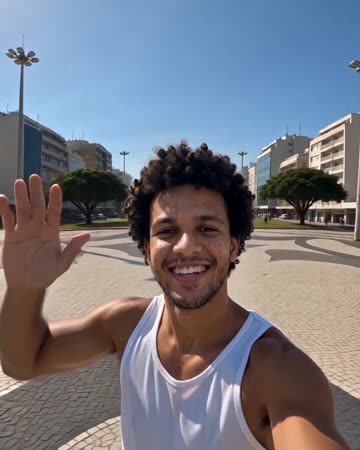
Earth Zoom Out AI
travel intros
The camera leaves the person or landmark, rises through surroundings and clouds, and ends on Earth against space. The continuous change in scale needs a readable opening before the source becomes small.
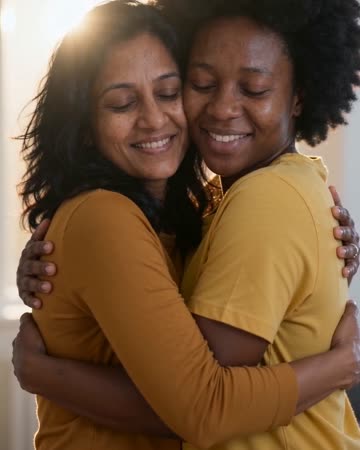
AI Hug Generator
reunion edits
The pair move closer and bring their arms together while the camera stays steady. Leave shoulder space in the starting composition so the contact can develop visibly rather than beginning with tangled limbs.
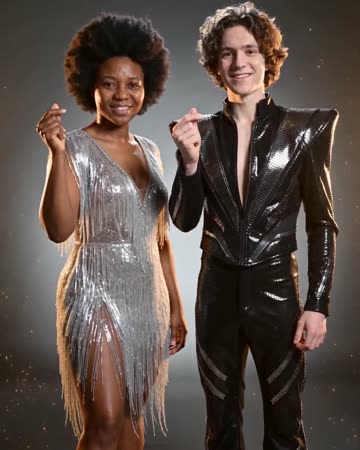
Outfit Switch AI
outfit collections
In a clean studio, a finger snap and flash reveal a different casual outfit; a second snap reveals formal eveningwear. Face, hair and body position remain the continuity anchors.
AI Video Effects
Upload a photo with a readable person or landmark and some surrounding context.
Create this effect