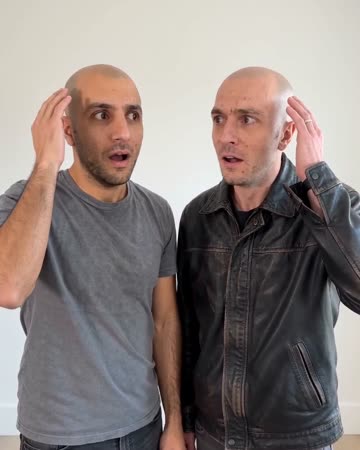
AI Bald Filter: Inspect the Hairline Transformation
The change is concentrated around the hair: a small shimmer removes it while the face and background aim to remain recognizable. A stable close view makes the transformation easier to judge. The preset requests a playful sound effect at the hair transformation.
Create a before-and-after reveal or a character transformation gag. Keep the original still beside the result when comparing facial identity.
Inside this effect
Change the hair, keep the face central
A small shimmer removes the hair while the close view stays stable. The visual comparison depends on a complete crown and readable facial outline rather than dramatic camera movement.
What makes the composition readable
A photograph does not reveal the scalp hidden under hair. The resulting head shape is an artistic estimate, so use the clip as a playful style experiment rather than a prediction.
Sound in a new creation
A playful transformation cue accompanies the hair change, with no added spoken line.
Choose the output for your edit
New drafts start at 12 seconds, 720p and vertical 9:16. Advanced shows the models and compatible lengths, resolutions and formats. Check the total credits before generating; the options follow the selected model.
From source photo to finished clip
Start with a solo or shared photo, or choose two separate sources when the idea includes a pair. Confirm the crop and current settings before generating.
Expose the head outline
Pick a front portrait with space above the crown.
Review the hair transition
Compare forehead, ears and glasses before and after the change.
Build the reveal cut
Place the original portrait first, then cut to a stable transformed frame.
Ways to use the result
A hairstyle comparison
Place a still of the original beside the moving reveal, keeping both images at a similar face scale.
A light character introduction
Use the short shimmer as a comic reveal, then return to the unaltered photo to keep the joke clear.
Prepare the source for this movement
- Include the entire crown without a hat.
- Choose even light along the hairline.
- Avoid hands touching or covering the head.
The clip cannot predict hair loss or reveal an anatomically accurate hidden scalp. Hair removal may alter ears, glasses or facial boundaries.
Frequently asked questions
Will it predict my actual scalp shape?
The unseen scalp is inferred. Treat the result as a visual transformation rather than a reliable appearance prediction.
Can I use a photo with a cap?
A cap hides the outline needed for this effect; an uncovered head is a clearer source.
Will eyebrows also disappear?
The direction targets hair, but inspect eyebrows and facial boundaries because model changes are not perfectly isolated.
Can this guide a medical decision?
No. It is a creative hairstyle visual, not a clinical assessment or treatment preview.
Can it precisely reduce only part of the hair?
There is no scalp-region or hair-density editor. The preset applies its fixed bald transformation.
Where is the cost shown, and what if generation fails?
The generation button shows the total for your selected model and output settings. Credits are deducted when the task is created; credits for a task confirmed failed are returned. Review the displayed total rather than assuming every model costs the same.
Explore another direction

Outfit Switch AI
outfit collections
In a clean studio, a finger snap and flash reveal a different casual outfit; a second snap reveals formal eveningwear. Face, hair and body position remain the continuity anchors.
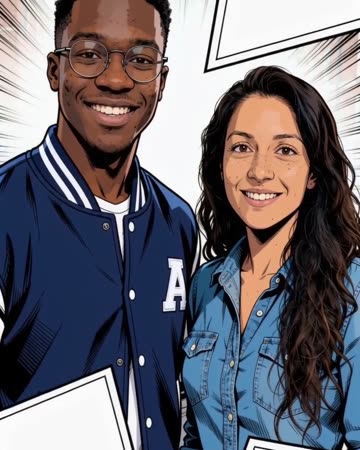
Comic Book AI
comic avatar visuals
Bold outlines and flat comic colors transform the source subjects while small expressions continue. Clean graphic panels frame the shot without relying on automatically readable dialogue.

80s AI Video
retro posts
Period-inspired casual clothes and fuller hairstyles meet light bouncing, laughter and a lean toward a handheld camera. Soft analog color and restrained tape texture build the retro feeling.
AI Bald Filter
Pick a front portrait with space above the crown.
Create this effect