80s AI Video: Build a VHS Home-Movie Moment
A convincing home-movie look needs more than a heavy filter. This preset aims for soft colors, slight handheld movement and restrained analog texture, letting an ordinary expression feel like a casually recorded moment. The preset requests original retro music and a subtle tape-like atmosphere.
Begin a family memory with the original photo, then use the animated shot with retro music and tape ambience; cutting against a present-day shot can emphasize the contrast. Add exact dates and titles in an editor, adjusting the native soundtrack if needed.
Inside this effect
A backyard home-movie rhythm
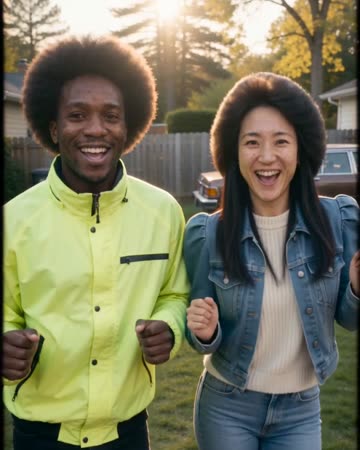
Period-inspired casual clothes and fuller hairstyles meet light bouncing, laughter and a lean toward a handheld camera. Soft analog color and restrained tape texture build the retro feeling.
What makes the composition readable
Restoration and retro styling have different goals: restoration tries to recover readable detail, while this look deliberately adds period character. Begin with a clear image so the texture does not consume the features you want to recognize.
Sound in a new creation
Original retro-inspired music and subtle tape-like ambience accompany the scene rather than a recovered 1980s recording.
Choose the output for your edit
New drafts start at 12 seconds, 720p and vertical 9:16. Advanced shows the models and compatible lengths, resolutions and formats. Check the total credits before generating; the options follow the selected model.
From source photo to finished clip
Start with a solo or shared photo, or choose two separate sources when the idea includes a pair. Confirm the crop and current settings before generating.
Start with a clean memory
Use a naturally lit portrait or casual two-person photo rather than a heavily filtered image.
Inspect a short VHS shot
Start with a supported short duration and inspect facial clarity, clothing changes and the strength of the analog look.
Finish the period edit
Replay the retro music and tape ambience, then combine the download with album photos and add your own dates and captions.
Ways to use the result
Then versus now
Start with a current photograph, show the invented retro scene and close on a real contemporary moment.
A playful family chapter
Use the home-movie texture for one chapter, keeping real dates in separate captions.
Prepare the source for this movement
- Choose daylight or soft indoor light with readable eyes.
- Avoid stacking VHS texture onto an already noisy screenshot.
- Keep heads and shoulders inside the chosen crop.
Period styling may reinterpret clothes and surroundings. Original retro music and tape ambience accompany a stylized reconstruction, not recovered historical footage or an original recording; inspect important faces.
Frequently asked questions
Must the source photo be from the 1980s?
No. A modern, clear portrait can be the starting point. The preset supplies a retro visual direction rather than verifying when the photograph was taken.
Why can a VHS look make a face less clear?
Analog texture competes with fine facial detail. Use a less compressed source and review the face at normal playback size before keeping the shot.
Is this the same as restoring an old photo?
No. Repairing scratches and recovering detail are preparation tasks. This preset animates a photo with a deliberately nostalgic appearance.
Are dates and camcorder sound included?
The preset requests original retro music and subtle tape ambience. There is no date-text control; add exact dates and readable titles after downloading.
Will it certify a photograph as vintage?
No. The styling is a creative interpretation applied to the source, not a date or authenticity check.
Can I set the exact tape damage?
There is no tape-defect timeline or exact analog-camera model selector. Review whether the texture leaves faces readable.
Where is the cost shown, and what if generation fails?
The generation button shows the total for your selected model and output settings. Credits are deducted when the task is created; credits for a task confirmed failed are returned. Review the displayed total rather than assuming every model costs the same.
Explore another direction
Animate Old Photos
family albums
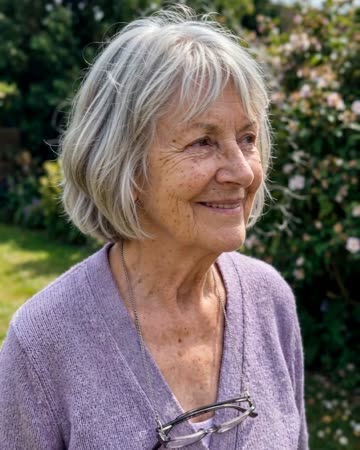
A blink, natural breathing and a gentle smile add motion to an old portrait. The direction keeps the original framing rather than introducing a new scene or an elaborate camera journey.
Photo to Video AI
animated albums
Natural breathing, subtle environmental motion and a slow camera move add life without replacing the source composition. The people and setting should remain recognizable through one continuous clip.
AI Family Video
family keepsakes
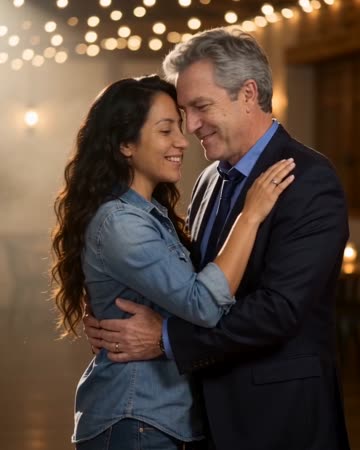
Under string lights, the source pair take a comfortable dance hold, sway, make a small shared turn and face the camera in a close pose. This page focuses on that two-person moment.
80s AI Video
Use a naturally lit portrait or casual two-person photo rather than a heavily filtered image.
Create this effect